
First off, thank you for being part of the Nx community. Your support and contributions are what make Nx great and continue to drive it forward as the go-to solution for delivering the best developer experience in monorepos. Over the years, Nx has grown and evolved—together with Nx Cloud—into a complete solution for managing monorepos at every stage of the development cycle, both locally and in CI.
In 2024, we focused on making Nx more adaptable—fitting seamlessly into both OSS projects and large enterprise codebases. Our goal has been to strike the right balance between flexibility and power, ensuring Nx scales with your needs while staying easy to adopt in existing setups. This is only possible by working with the community, collaborating with other tooling teams in the ecosystem, and engaging directly with large enterprises.
As we look back on the year, we’re excited to share the highlights and give you a glimpse of what’s coming in 2025.
Top 10 Highlights (in no particular order of importance)
Here are our picks for the top 10 highlights for 2024. There’s no particular ordering here in terms of more or less relevance.
Project Crystal
Nx has been solving monorepos long before package managers introduced features like workspaces. Initially, we used TypeScript path mappings to manage project linking, resulting in what we called integrated monorepos—fully powered by Nx plugins to automate setup and tool integration.
When npm, Yarn, and PNPM introduced “workspaces”, another path emerged: package-based monorepos, where Nx primarily served as a fast task runner with caching and parallelization.
Both approaches have clear benefits: integrated monorepos are highly automated but opinionated, while package-based monorepos offer flexibility but require more expertise to manage. However, mixing the two wasnt straightforward, largely due to how Nx plugins were originally designed.
We didn’t want you to have to choose. We wanted the best of both worlds, which led to Project Crystal—an effort to make Nx plugins more flexible and adaptable. These “crystalized” plugins:
- Rely on your tooling’s configuration files (e.g.,
@nx/viteenhancesvite.config.tsinstead of replacing it). - Enhance but don’t interfere, offering a better experience without being required.
Over the past year, we’ve “crystalized” most of our plugins, making it easier to converge the two types of monorepos.
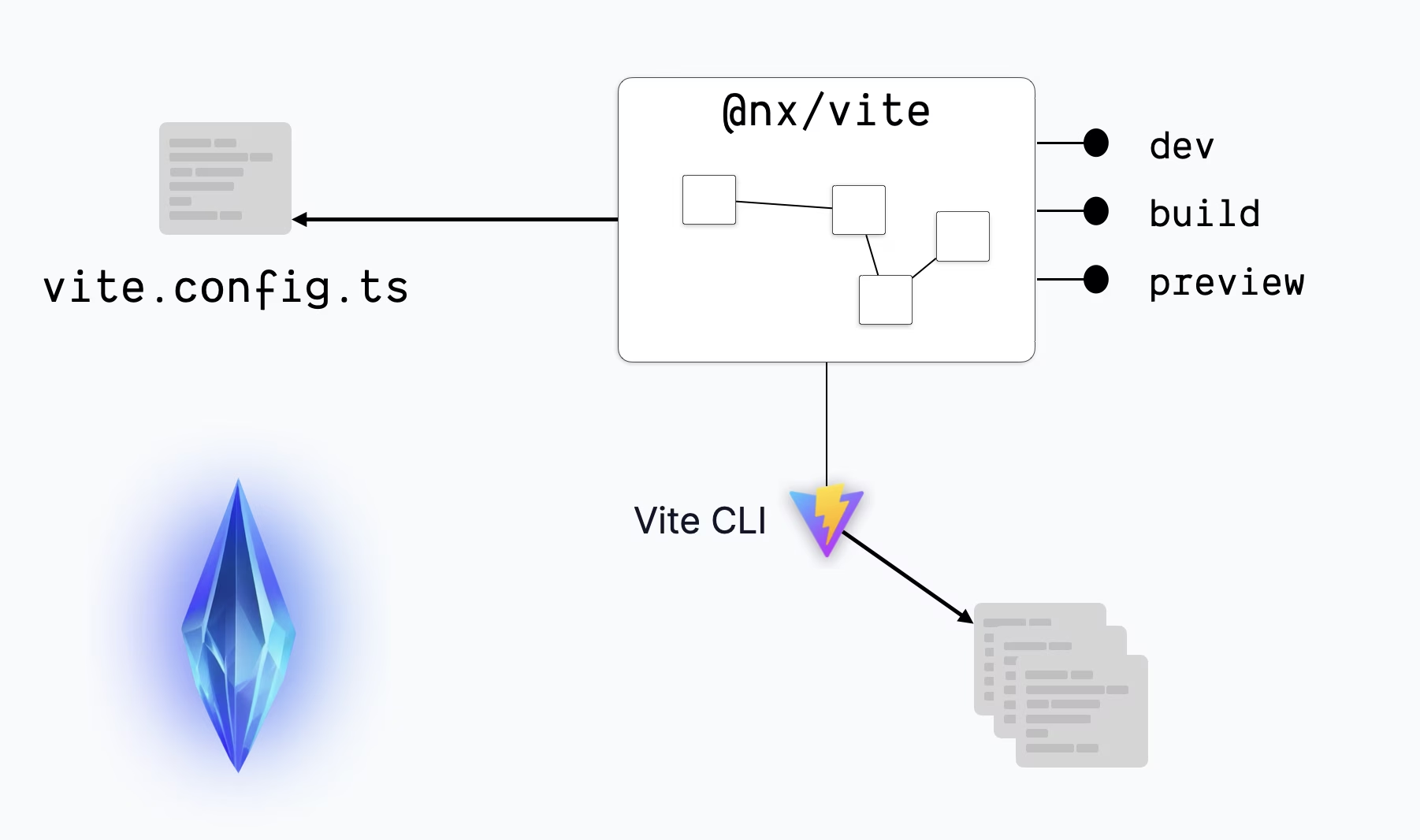
This approach gives you flexibility while maintaining the high DX and automation that make Nx indispensable for scaling and maintaining monorepos.
Want to learn more? Check out our announcement blog post and documentation.
Nx Agents, Atomizer and Flakiness detection
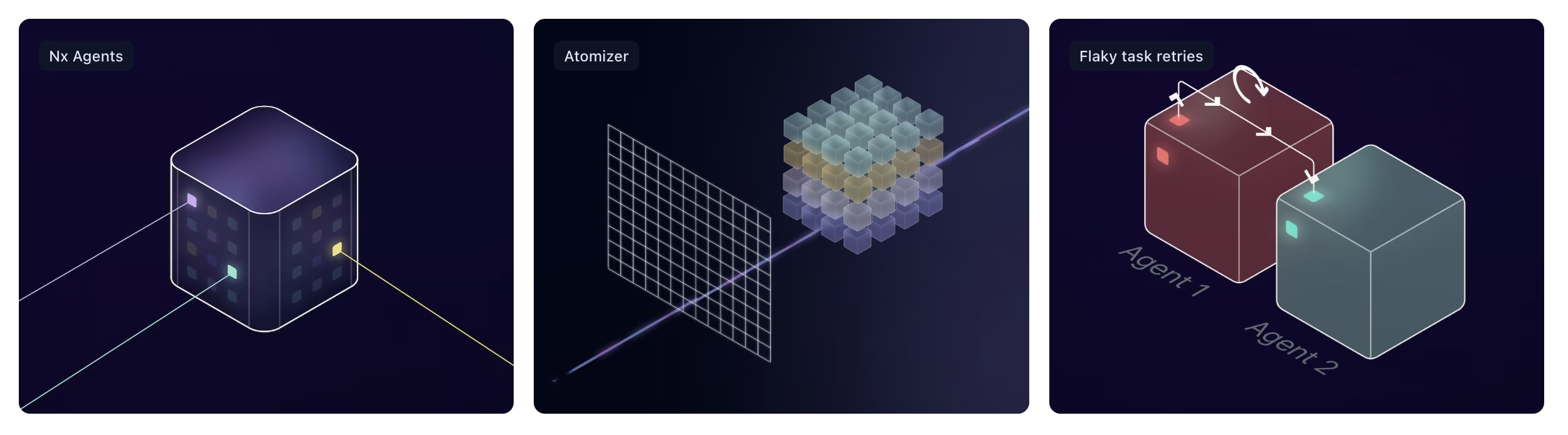
With Nx we want to support you not just locally when setting up, maintaining and scaling a monorepo, but throughout the entire stack, a big part of which is CI. If your monorepo doesn’t work on CI, it’s not working. So Nx Cloud has become a big focus of us when it comes to monorepos on CI. This year was particularly exciting since we introduced some of the most impactful features:
When remote caching forms the basis, these three features are what really lifts your CI to the next level. At some point you will have to parallelize tasks across different machines. We’ve been doing this a lot, by manually scripting complex CI setups for our clients. A lot of these learnings fused into making Nx Agents as seamless and efficient as it is today.
Manual parallelization will always be suboptimal, time consuming and difficult to maintain because it is a static optimization while your monorepo structure keeps changing. We’ve written a blog post that dives into the mental model behind a “push based” (traditional) and “pull based” (Nx Agents) distribution model on CI.
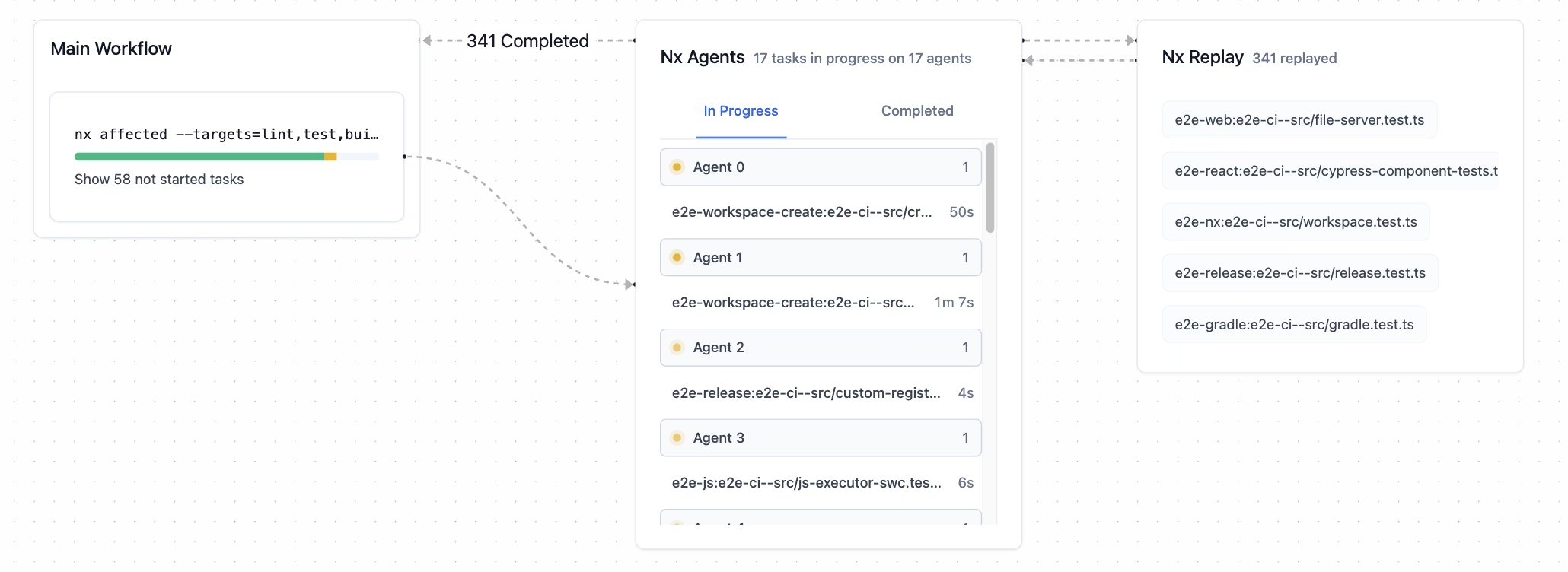
If you haven’t tried Nx Agents yet, you can enable it with a single line on your CI:
npx nx-cloud start-ci-run --distribute-on="3 linux-medium-js"Also check out our docs and our free video course where we convert an existing CI setup to leverage Nx agents.
Now, once you have powerful distribution configured on CI, you might still run into an issue: long running tasks, aka e2e tests. The are usually taking a super long time and you need to run them in one block which makes distribution inefficient.
This is why we introduced Atomizer, which literally allows you to automatically split (“atomize”) long-running tasks into more fine-grained runs that can then be distributed in a much more efficient way but Nx Agents.
TODO: INSERT ANIMATION OF TASK SPLITTING
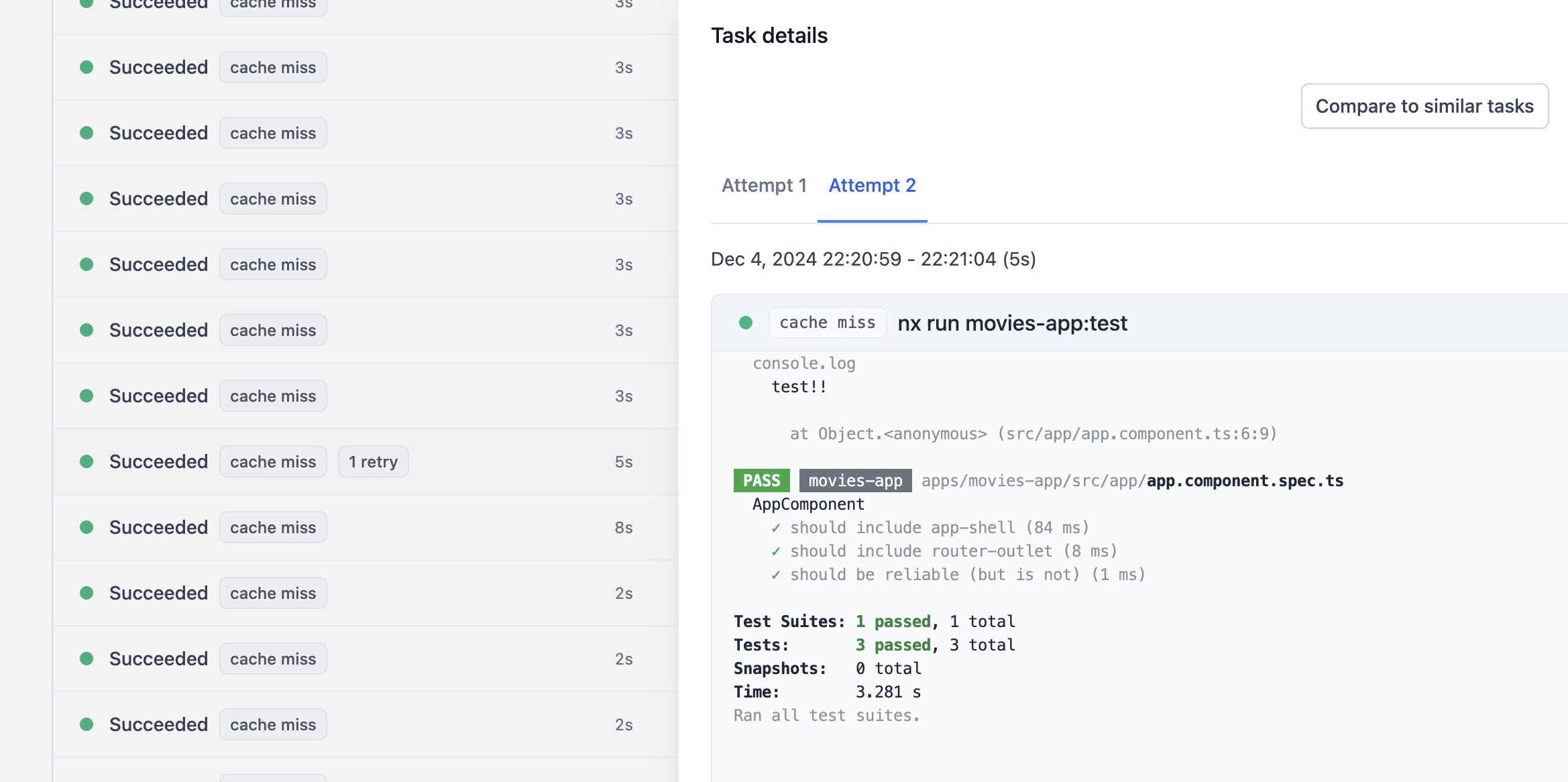
And finally, we also introduced automated flakiness detection on all these task runs. Flaky tasks (most often tests or e2e tests) are annoying because they make you loose a lot of time, having you to re-trigger a CI run and monitor the progress. With the automated flakiness detection you won’t even notice. Nx Cloud just retries and resolves the task if it succeeds on the 2nd run.
Nx Release
A big use case for Nx is not just application monorepos, but also for developing and publishing related packages to NPM. One key feature that was missing in Nx is the ability to run the whole versioning, changelog generation and publishing process. You could obviously integrate 3rd party tools like Lerna or Changesets but many wanted a more deeper integration in Nx. So we released “Nx Release”. It manages the whole cycle of
- generating a new version
- generating changelogs
- publishing to NPM or some other registry
Nx Release is extremely flexible, it comes with a programmatic API and is implemented in a tech agnostic way. Nx itself provides the foundations which can then be extended for package specific versioning strategies. @nx/js specifically adds support for versioning and publishing JavaScript/TypeScript specific packages. But you can extend it to Go, Rust, Java and other languages. It might at some point even evolve beyond just releasing packages, but also be used for Docker containers and application publishing.
Check out our docs to learn more or browse the various Nx release recipes showing how to customize it to your needs.
Gradle support
2024 marked an exciting milestone with the release of our new @nx/gradle plugin. This plugin integrates Gradle projects into Nx workspaces, enabling teams to leverage Nx’s powerful features like task caching, parallel execution, and dependency-based task orchestration for Java and Kotlin projects.
Traditionally, managing Gradle projects alongside JavaScript libraries in a monorepo was complex, with few tools designed to handle such mixed tech stacks. With @nx/gradle, we’ve streamlined this process. Gradle projects are now treated as first-class citizens in an Nx workspace, allowing you to:
- Run Gradle tasks using Nx commands (e.g., nx build myproject)
- Visualize dependencies across projects, including Gradle composite builds, with the Nx Graph
- Execute only the tasks affected by changes, dramatically speeding up builds and CI pipelines.
The Gradle Composite Build Support takes this further by enhancing the task graph with dependencies from composite builds. Whether your workspace includes Gradle-only projects or a mix of JavaScript and Gradle libraries, Nx ensures seamless task execution and caching across the stack .
Additionally, this plugin reflects our broader goal of breaking down ecosystem barriers. It represents a step toward robust, polyglot monorepos that enable teams to work across languages and frameworks efficiently.
For a deeper dive into Gradle support and how to get started, check out our blog post “Manage Your Gradle Project using Nx” and the accompanying Gradle tutorial.
Nx import
Migrating projects into a monorepo has long been seen as a complex and error-prone task. With nx import, introduced in 2024, we’ve reimagined the migration experience to make it seamless, preserving your Git history and minimizing disruption.
At its core, Nx import leverages innovations from Project Crystal to create a smooth integration process. For instance, if you’re importing a Gradle-based app, Nx automatically detects the Gradle configuration, suggests installing the @nx/gradle plugin, and configures everything for you. The plugin reads your Gradle setup, infers runnable tasks, configures caching based on output paths, and integrates the app into your workspace. This ensures a consistent and seamless experience whether you’re running JavaScript or Java applications within the same monorepo.
With Nx import, you can:
- Automatically map existing repositories into an Nx workspace (while keeping your Git history)
- Retain your existing tooling configurations without sacrificing functionality.
- Enjoy a unified experience across all projects, with task orchestration, caching, and dependency graphing applied consistently.
This is a game-changer for polyrepo-to-monorepo migrations, enabling teams to consolidate repositories into a cohesive workspace while maintaining productivity. It transforms what used to be a challenging process into a straightforward workflow that’s flexible enough to handle diverse tech stacks.
Learn more on our docs.
GitHub managed orgs in Nx Cloud
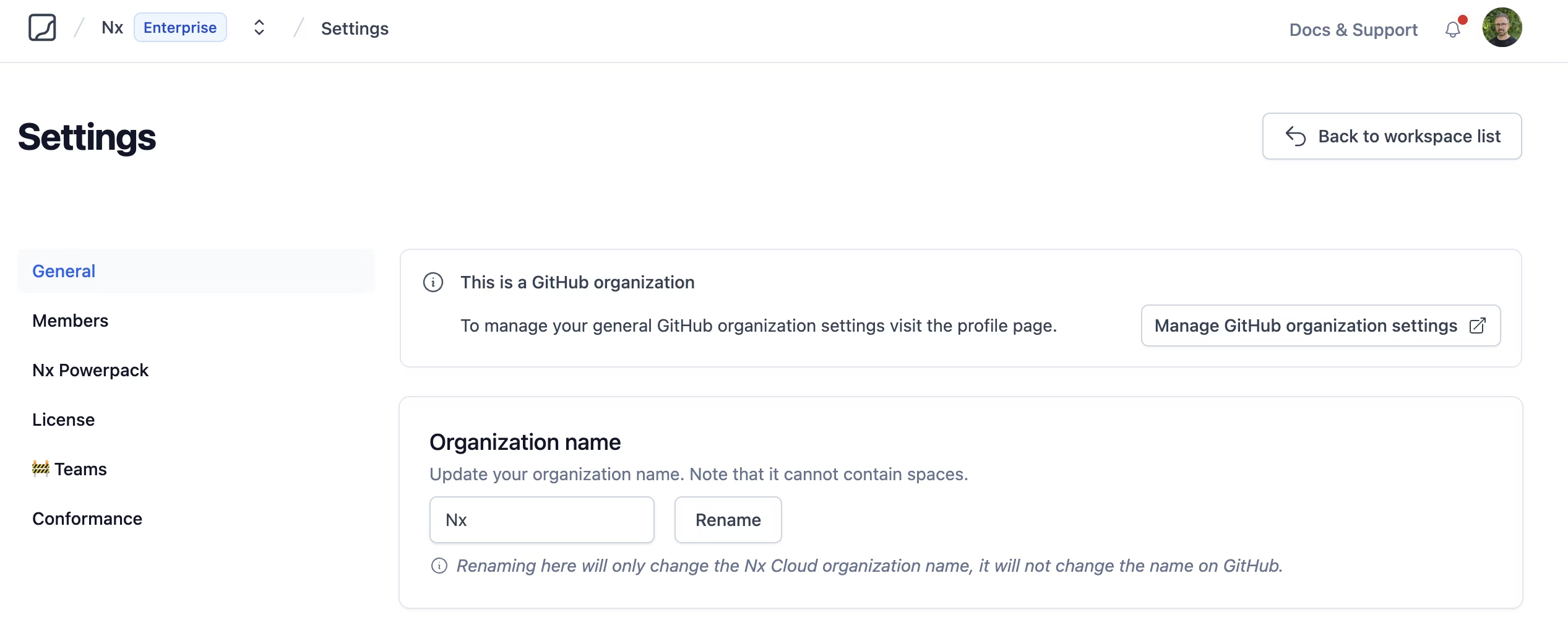
One goal we have with Nx Cloud is to making onboarding as easy as possible. Ultimately we want to improve your CI runs and thus avoid getting into your way with additional configuration and complexity. This year, we added GitHub-powered organizations to Nx Cloud to simplify onboarding and team management.
By connecting your GitHub organization, you can select repositories directly, and Nx Cloud automatically submits a PR to configure your workspace and sets up GitHub integration.
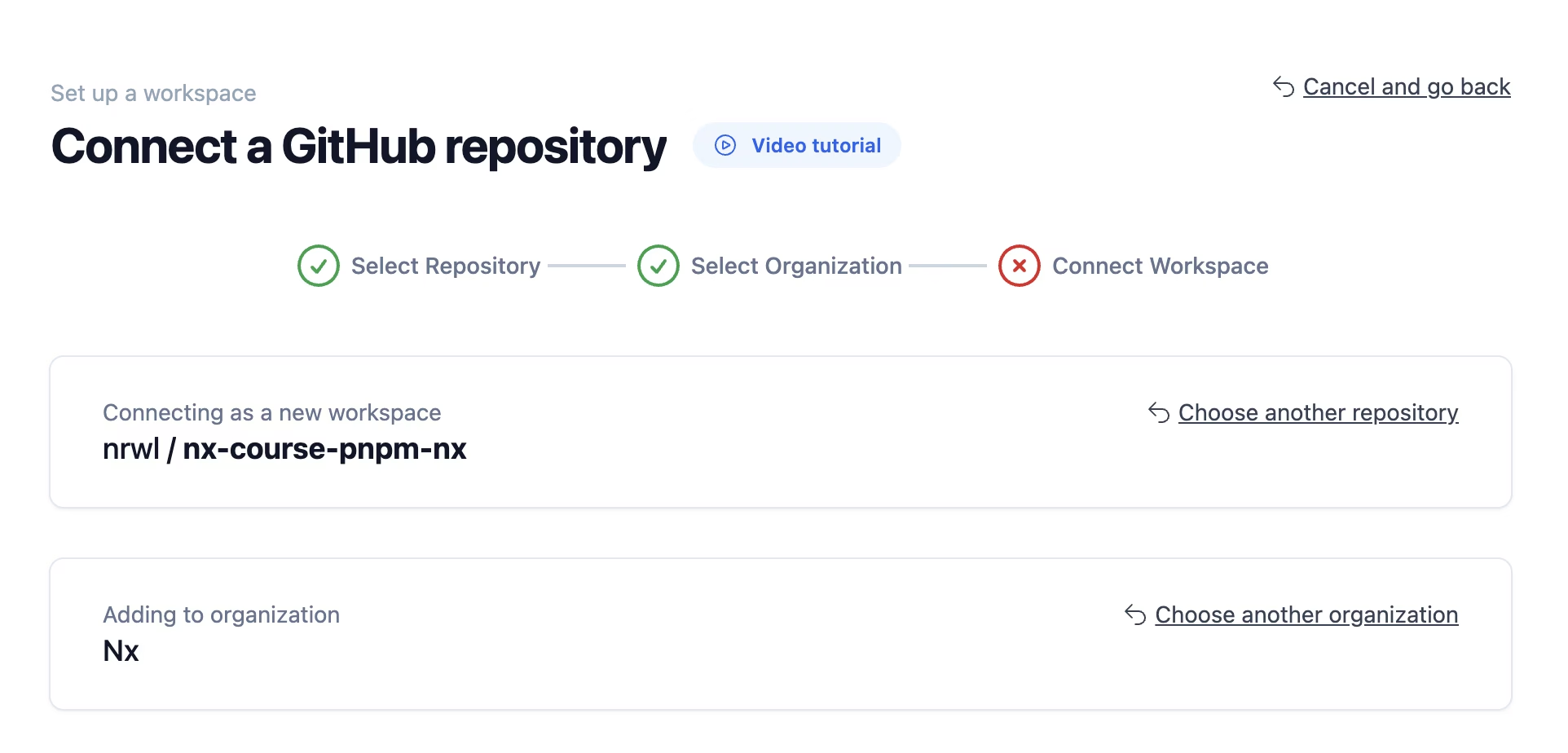
A big advantage is that the user management is handled through GitHub. Anyone linking their GitHub account to Nx Cloud automatically joins the corresponding organization, and membership updates sync from GitHub, reducing the need for manual adjustments.
You can learn more about what this looks like here.
Module Federation
In 2024, we continued to build on Nx’s excellent support for Module Federation, improving both functionality and developer experience based on customer feedback and closely collaborating with the community.
One major improvement was the introduction of a new pattern for the module-federation-dev-server, designed to maximize compatibility, minimize resource usage, and provide an enhanced local development experience. This new approach ensures that working with Module Federation in Nx is as seamless as possible and scales in large workspaces.
We also adopted Module Federation 2.0, bringing runtime plugins and other key enhancements to the table. In addition, we introduced Rspack Module Federation support, ensuring that Nx users can take full advantage of the latest tools and innovations in the ecosystem.
To make setup easier, we launched the @nx/module-federation package, which streamlines the configuration and management of federated applications within Nx workspaces. These efforts have been recognized by the broader community, with Nx now featured on module-federation.io.
For a closer look at the technical details of how Module Federation works in Nx, check out the technical overview or chime into one of our live streams on Module Federation with Rspack. With these updates, we’re making it easier than ever for teams to adopt and scale federated architectures.
Nx Console
Nx Console has become an integral part of the “Nx experience”. In 2024, we introduced several key updates.
One was the Project Detail View. With project crystal, Nx is able to dynamically infer targets that can be run based on your configuration. You can view these dynamically inferred tasks by running nx show project my-project --web. But it is much more convenient to view them directly in your editor with Nx Console, showing you all the details about the command that is run, their options, caching configuration and more.
TODO insert animation of project view
Another big highlight that got released recently is the ability to visualize your Nx Cloud CI Pipeline executions. This feature eliminates the need to constantly monitor CI logs or switch back and forth between your editor and CI dashboards. Instead, you can keep working on your code, and Nx Console will notify you right in your IDE when a pipeline succeeds or fails.
TODO insert animation
And there’s more to come, so stay tuned. If you haven’t already, try Nx Console for VSCode or JetBrains IDEs to see the difference it can make.
Affected Project Graph in Nx Cloud
Optimizing and debugging CI pipelines often requires understanding the impact of changes across your workspace. The Affected Project Graph in Nx Cloud is a powerful addition to the suite of tools designed to help you debug, reason about, and optimize your monorepo.
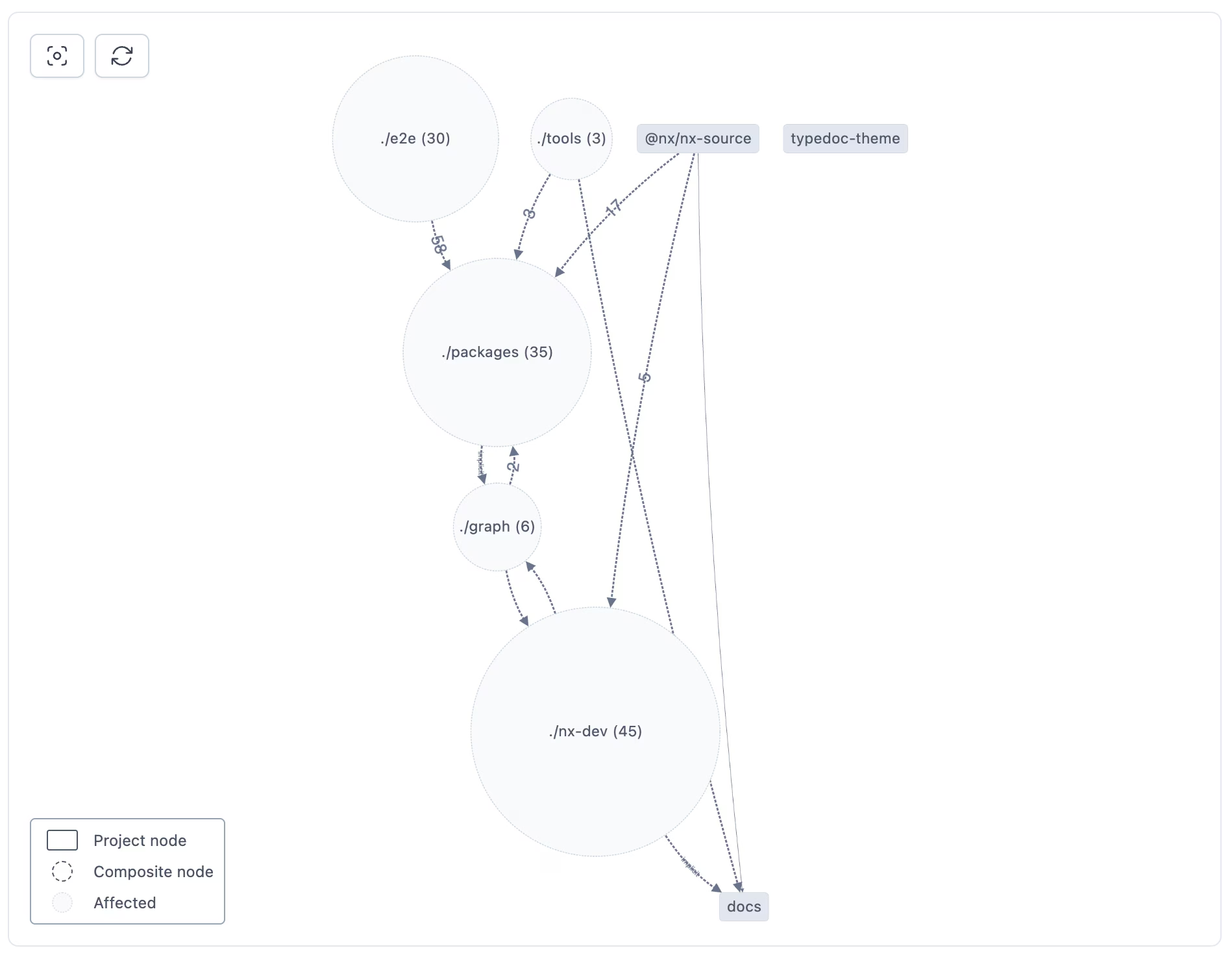
This feature builds on existing capabilities, like the tools for troubleshooting cache misses, which help identify what invalidated your cache and how to optimize for faster CI runs. The Affected Project Graph takes this a step further by visually representing which projects are impacted by a given change.
By providing a clear view of dependencies and their relationships, the Affected Project Graph allows you to:
- Debug CI pipelines more effectively, understanding why certain tasks ran and identifying bottlenecks.
- Optimize your workspace structure, such as refactoring dependencies or splitting critical paths.
- Gain deeper insights into your monorepo, making it easier to manage and scale as your projects grow.
For a closer look at this feature and its benefits, check out our blog post: “Understand the CI Affected Graph”. Combined with other debugging tools in Nx Cloud, the Affected Project Graph empowers teams to fine-tune their workflows and get the most out of their CI pipelines.
Local caching moves to DB storage
At Nx, improving speed is a constant focus. As part of this effort, we’ve transitioned local caching from a file-based system to a database-backed approach. This change not only provides modest performance gains by reducing I/O overhead but also opens up exciting opportunities for enhanced cache management.
With database-backed caching, we can now explore features like retaining only relevant cache entries based on usage, setting a maximum cache size, and optimizing task orchestration by prioritizing failed tasks earlier. These improvements make local caching faster, smarter, and more efficient.
This transition is part of our broader initiative to rewrite performance-critical components of Nx into Rust, ensuring Nx remains at the cutting edge of performance and scalability.
Coming up in 2025
We have already a lot of exciting features that we want to ship next year. Here are some of them we’re looking forward to.
Local agents
Nx Cloud focuses on balancing efficiency and cost, dynamically scaling agents based on PR size or workload. But even with that, developer machines often sit underutilized.
Local Agents tap into that idle power by connecting your computer to Nx Cloud. When underused, your machine can run tasks via Nx Agents, seamlessly syncing results back to the cloud without disrupting your workflow.
A proof-of-concept is already in place, and we’re working to turn it into a full feature. Stay tuned as we continue to refine and roll this out.
Polygraph
Polygraph is our term for a set of cross-repository features we’re building into Nx Cloud. In many organizations, it’s common to manage multiple monorepos and polyrepos, rather than a single, unified repository. Whether due to technical limitations or by design, the reality is that projects often span across several repositories.
Polygraph aims to provide visibility and control across these repositories. With it, you’ll be able to:
- Run conformance rules across all repositories within your Nx Cloud organization.
- Visualize dependencies between projects in different repositories with a multi-repo graph.
- Gain insights and enforce standards consistently across your entire codebase, no matter how it’s structured.
This initiative reflects our focus on supporting large-scale, distributed development environments, ensuring teams can maintain structure and efficiency even across complex repo setups.
Rewrite Nx Core in Rust
Nx already has performance-critical parts written in Rust, and in 2025 we’re continuing this by rewriting more of the Nx core. Our goal is to minimize overhead and make Nx as fast and efficient as possible. By leveraging Rust’s speed, we can reduce runtime costs and ensure Nx performs well, even in large, demanding workspaces.
Nx’s core is tech agnostic, and this rewrite enhances that flexibility. While Nx supports managing Java and other technologies, it still relies on Node.js. Moving the core to Rust opens the door to compiling Nx into a lightweight binary, potentially removing the Node.js dependency entirely.
This rewrite affects only the core. Plugins will remain in TypeScript to keep Nx extensible and open for community contributions.
Support infinite/long-running tasks
We still need to come up with a proper name. Some call them infinite tasks, some long-running, some persistent. Basically tasks like dev servers or watch-mode builds. Nx currently expects tasks to complete, which can cause issues when other tasks depend on infinite ones. For example, if an e2e task depends on a dev server starting, Nx may stall waiting for the server to finish, which it never does.
We have an active RFC proposal open how we want to implement such tasks, allowing for more complex workflows such as e2e tasks or microservices. We’re looking forward to launching them next year.
Merge Integrated and Package-based Monorepo Support
We’re transitioning from TypeScript compilerOptions.paths to workspace-based linking with npm, yarn and pnpm. This combines the flexibility of -say - a PNPM workspace with the automation and tooling of Nx Plugins.
Previously, developers leveraging Nx had to chose between integrated monorepos (driven by Nx plugins and opinionated setups) and package-based monorepos (workspace linking). With Nx Crystal Plugins, that choice disappears—these new plugins are lighter and more flexible, letting you use workspaces while still benefiting from automation that comes from the plugins.
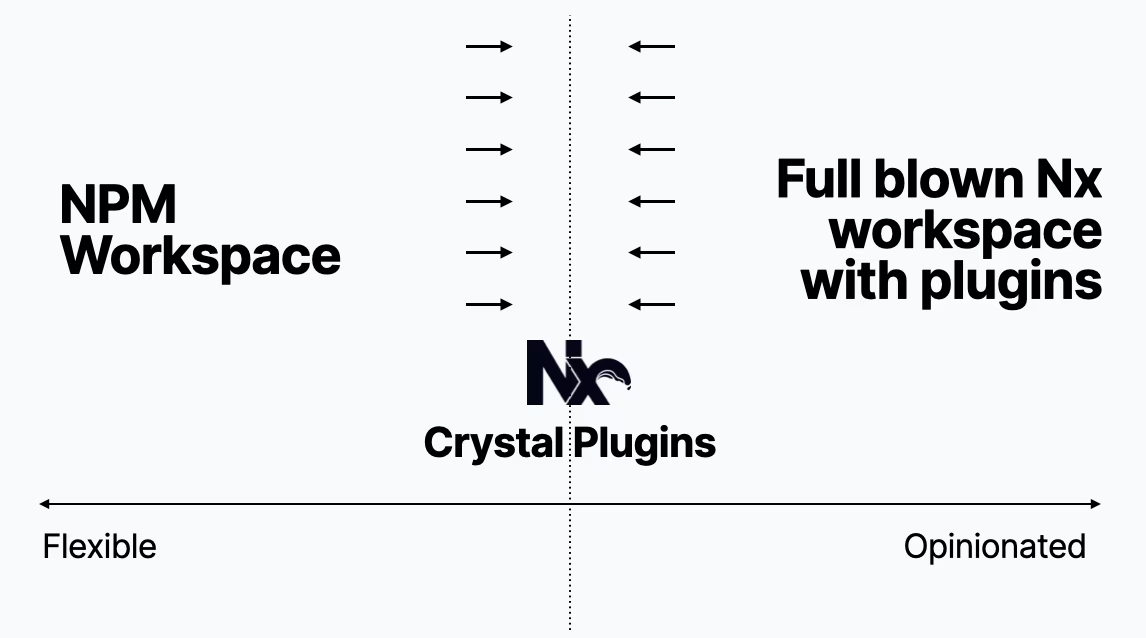
If you’re an existing Nx user, don’t worry. Existing workspaces aren’t affected. The current setup will continue to work and be supported. For new projects, this shift makes it easier to adopt Nx in existing monorepos or migrate from polyrepos, simplifying integration into modern workflows.
This change is outlined in an active RFC. If you have thoughts or feedback, please let us know.
Complete redesign of the Nx terminal interface
The terminal is the main interface for Nx users, and we’re focused on making it as polished and efficient as possible. In 2025, we’re rolling out a complete redesign of the Nx terminal interface to improve clarity and usability.
We’re fine-tuning every detail—ensuring colors stream correctly, layouts are clean, and you get the information you need without unnecessary noise. The goal is to keep noise to a minimum while surfacing the most relevant insights.
A big part of this redesign is better support for long-running tasks, like running multiple dev servers or managing e2e tests that spin up background services. This update will make it easier to handle complex workflows right from the terminal.
Improved Node experience
Nx has supported Node.js from the start, but we haven’t had the chance to focus on improving its developer experience—until now.
Next year, we’re investing in better Node support, with improvements to Docker, microservices, and overall workflows. Our goal is to bring the same level of polish to Node that Nx offers for frontend projects, making it easier to manage and scale backend services in monorepos.
Continue Polyglot story
Nx has grown beyond JavaScript, supporting tools across different ecosystems. While integrating non-JS technologies often requires deeper know-how, we’re making it easier.
This year, we introduced Gradle support, simplifying Java app management in Nx workspaces. Next, we’re expanding to Maven and .NET, continuing to break down barriers for polyglot monorepos.
Our goal is to make Nx a go-to tool for managing projects across tech stacks, keeping workflows fast and consistent.
Excited?
We definitely are. That said, we wish you all some relaxed days as we’re closing 2024 and, if you’re celebrating, Merry Christmas! We hope to see you all next year. Thank you for being part of the Nx Community!