A Visual Feedback Loop for Electron Apps with Claude Code
When building Electron apps with an AI coding agent, you run into a fundamental problem: the agent can’t see what it’s building. It writes code, runs the build, maybe checks the logs, but never actually looks at the rendered UI. If the window is blank or the layout is broken, it has no way to know.
I found a way to close that gap using agent-browser and Chrome DevTools Protocol (CDP). Every Electron app is built on Chromium, which means it supports --remote-debugging-port out of the box. You launch the app with that flag, connect agent-browser, and now the agent can take screenshots, inspect the DOM, and verify that the UI actually renders correctly.
Here’s how I set it up for an Electron app built with electron-vite in an Nx monorepo.
A half-day of talks on AI and monorepos, with speakers like Kent C. Dodds, John Lindquist, and Jack Herrington. Register at monorepo.tools/conf.
Prerequisites
You need two things: agent-browser (the CLI that talks to Chromium via CDP) and the Electron skill for Claude Code (which teaches the agent how to use it).
Install agent-browser
Follow the installation guide to get the CLI:
npm install -g agent-browserInstall the Electron skill for Claude Code
The Electron skill gives Claude Code the knowledge to launch Electron apps with CDP, connect agent-browser, and use the snapshot/screenshot workflow. Install it via the skills CLI:
npx skills add vercel-labs/agent-browser --skill electronOnce installed, Claude Code will automatically use it when you ask it to interact with an Electron app.
Launching with CDP enabled
Electron apps accept --remote-debugging-port as a command-line flag. With electron-vite, you pass it after -- so it gets forwarded to Electron:
npx electron-vite dev -- --remote-debugging-port=9333Pick a port that’s not already in use. Port 9222 is commonly taken by Chrome itself.
Running via Nx
If your Electron app lives in an Nx monorepo, the electron-vite scripts in package.json get picked up as Nx targets automatically. The easiest way to always have CDP available during development is to bake the flag directly into your dev script:
{
  "scripts": {
    "dev": "electron-vite dev --watch -- --remote-debugging-port=9333",
    "build": "electron-vite build"
  }
}
The -- tells electron-vite to forward everything after it to the Electron binary. There’s no downside to having remote debugging enabled during development, so this keeps things simple. Now pnpm nx run my-app:dev launches the app with CDP ready to go.
You can verify the CDP endpoint is available with curl:
curl -s http://localhost:9333/json/versionThis should return something like:
{
  "Browser": "Chrome/130.0.6723.191",
  "Protocol-Version": "1.3",
  "User-Agent": "...Electron/33.4.11..."
}
Connecting agent-browser
Once the app is running with CDP enabled:
agent-browser connect 9333Now you can interact with the app the same way you would with a regular web page:
# List available windows/webviews
agent-browser tab

# Take a screenshot
agent-browser screenshot /tmp/my-app-screenshot.png

# Inspect the DOM
agent-browser snapshot -i
The feedback loop in Claude Code
The real value is wiring this into your coding workflow. After making changes, Claude Code can:
- Build and launch the app with CDP enabled
- Connect via agent-browser
- Take a screenshot
- Read the screenshot (Claude is multimodal) and verify the output
- Fix any issues and repeat
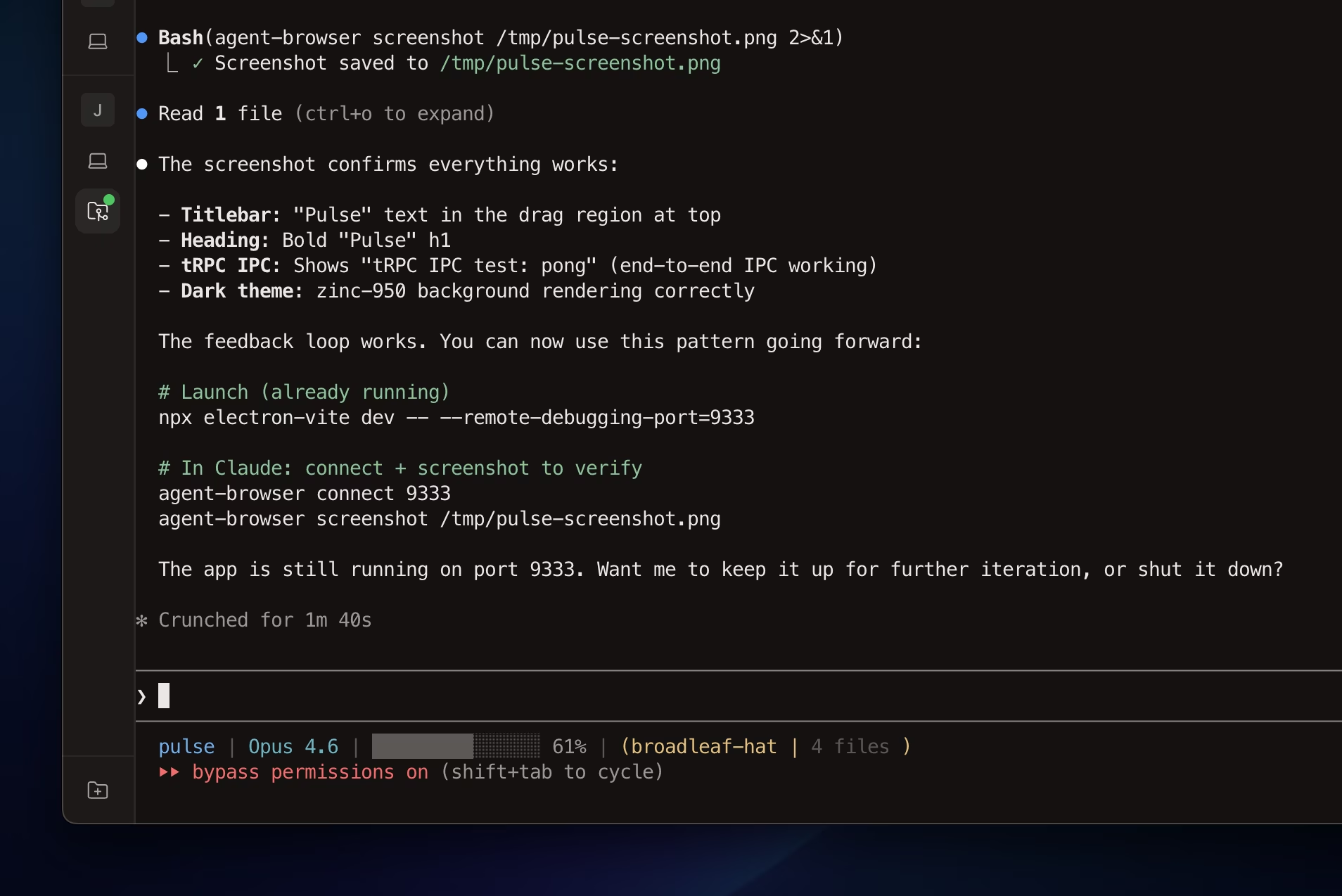
Here’s what that looks like in practice:
And the verified screenshot from agent-browser:

The screenshot shows a frameless window with a custom titlebar and “tRPC IPC test: pong”, which proves the full stack works: Electron main process, preload bridge, tRPC IPC, and the React renderer.
Why this matters
Without visual verification, an AI coding agent is essentially coding blind in Electron. It can check that the build succeeds and tests pass, but those don’t tell you whether the window is blank, the CSS is broken, or the IPC bridge failed silently.
With this feedback loop, the agent can catch rendering issues immediately and fix them in the same session. It turns a multi-step “build, launch, squint at the screen, report back” cycle into something fully automated.